
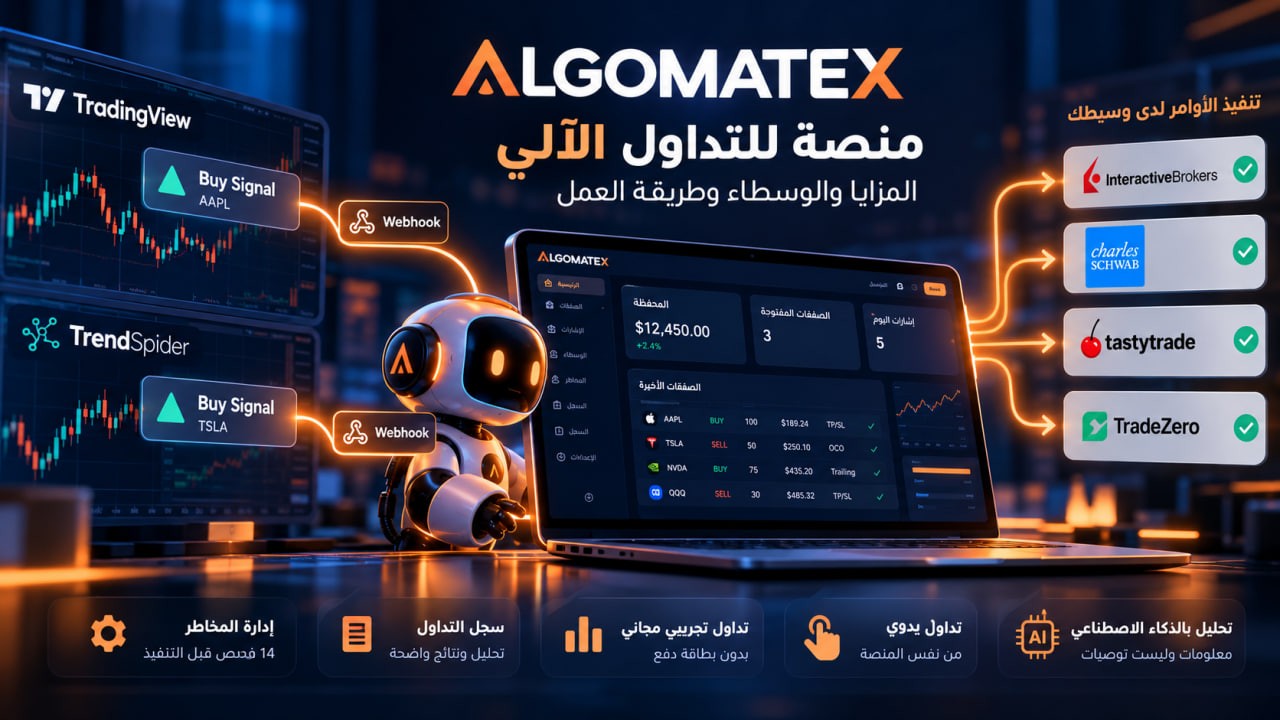
ALGOMATEX Automated Trading Platform: How It Works, Key Features, and Supported Brokers
ALGOMATEX is a technology platform that connects trading alerts to users' existing brokerage accounts, allowing signals to be converted into trading orders after applying configured risk management controls. It also offers manual trading, paper trading, and AI-powered trade analysis tools.
ALGOMATEX is not a broker. It does not hold or withdraw users' funds; all money remains in the connected brokerage account.
Explore ALGOMATEX and Its Features
Table of Contents
What Is ALGOMATEX?
How Do Trading Signals Become Broker Orders?
Key ALGOMATEX Services and Features
How to Get Started and Connect a Broker
TradingView and TrendSpider Integration
Supported Brokers and Trading Integrations
Paper Trading vs. Live Trading
Risk Management and Trade Protection
ALGOMATEX Plans and Subscriptions
Who Is ALGOMATEX For?
Frequently Asked Questions
Conclusion: How to Get Started
1. What Is ALGOMATEX?
ALGOMATEX is an automated trading technology platform designed for traders who already have trading strategies or use technical indicators and alerts and want to connect them directly to their brokerage accounts.
Instead of monitoring charts throughout the day and manually placing every buy or sell order, traders can create alerts in TradingView or TrendSpider and send them to ALGOMATEX using Webhook technology.
The platform receives each alert, checks execution settings and risk management rules, and forwards the trading instructions to the connected broker.
What Makes This Approach Different?
Users do not need to transfer their funds away from their brokerage accounts.
Traders maintain control over their strategies and trading signals.
Manual and automated trading can be used together.
Free paper trading accounts are available for testing.
The platform provides trade history and performance analytics.
AI applications can analyze trading information through read-only access.
ALGOMATEX does not include a TradingView or TrendSpider subscription. Each service requires its own separate subscription where applicable.
Discover All ALGOMATEX Features
2. How Do Trading Signals Become Broker Orders?
ALGOMATEX connects three main components: the alert source, the ALGOMATEX platform, and the brokerage account.
Stage One: Creating the Trading Signal
The user defines a trading strategy and the conditions that trigger a buy or sell alert.
The signal can originate from TradingView, TrendSpider, or another system capable of sending compatible Webhook requests.
Stage Two: Receiving and Validating the Alert
When the strategy conditions are met, the alert is sent to ALGOMATEX.
The platform validates the signal data, account settings, and risk management conditions before forwarding entry orders.
According to ALGOMATEX, every entry signal passes through 14 pre-trade risk checks.
Stage Three: Sending the Order to the Broker
If the signal passes the required checks, ALGOMATEX sends the trading instructions to the connected broker.
Depending on broker capabilities, these instructions may include:
Buying or selling an asset.
Specifying the order quantity or position size.
Setting a take-profit target.
Defining a stop-loss level.
Configuring a trailing stop.
Using linked exit orders, such as OCO, where supported by the broker.
Execution results are recorded within the platform for future review and analysis.
The website states that order forwarding typically takes less than 400 milliseconds. This is an operational claim made by the company, not a guarantee of actual broker execution speed or fill price.
3. Key ALGOMATEX Services and Features
First: AutoTrade — Automated Trading
The AutoTrade service allows trading alerts from charting and analysis platforms to be converted into orders at the connected broker.
Users can configure signal execution instructions in advance, including position sizing, trade direction, and certain entry and exit settings.
ALGOMATEX executes signals according to the configured rules. However, it does not guarantee that a trading strategy will be successful or profitable.
Second: Manual Trading
ALGOMATEX is not limited to automated signals.
The platform also provides a manual trading interface that allows users to enter trading orders directly.
The interface includes options for position sizing, order configuration, and protective levels, depending on the capabilities of the connected broker.
This service is suitable for traders who prefer to make their own trading decisions and manually control order execution.
Third: Artificial Intelligence and Trade Analysis
ALGOMATEX provides tools related to analyzing trading data with artificial intelligence.
Through AI Connect, MCP-compatible applications can access permitted information, such as account details, trading history, and performance data.
Examples of compatible AI applications mentioned by the platform include ChatGPT, Claude, and Gemini.
Important: AI Connect provides read-only access. It does not authorize AI applications to execute buy or sell orders.
AI-generated analysis should be considered informational assistance, not investment advice.
Fourth: Trading Journal
ALGOMATEX allows users to review their trading results and analyze historical performance using recorded trade data.
The trading journal includes performance indicators such as:
Net profit and loss.
Win rate.
Profit factor.
Drawdown.
Performance by strategy.
Trading performance by day or hour.
These indicators can help traders understand their historical trading results and evaluate their strategies.
However, historical performance does not guarantee future results.
Explore Trading Journal and Analytics
Fifth: Trade Logs and Alerts
ALGOMATEX trade logs help users monitor signals from the moment they are received until the system attempts to execute them.
The platform provides notification options through channels such as Telegram, email, and mobile devices, depending on the available services and settings.
Some workflows also support manual approval before trade execution.
Learn About Trade Alerts and Logs
4. How to Get Started and Connect a Brokerage Account
Users can begin with a paper trading account or select a paid subscription when they need to connect a live brokerage account.
Step One: Create an Account
Visit the official website:
Create a new account or sign in to your existing account.
Step Two: Check Broker Compatibility
Open the Brokers and Integrations page to verify whether your broker is supported and which assets and order types are available.
https://algomatex.com/ar/integrations
Step Three: Choose a Suitable Plan
If you want to connect a live brokerage account, review the paid plans, subscription conditions, and signal allowances.
https://algomatex.com/ar/pricing
Step Four: Connect Your Broker
Open the “Brokers” section inside ALGOMATEX and follow the authorization instructions displayed for your selected broker.
The authorization process and available account permissions may differ depending on the brokerage provider.
Step Five: Test Your Settings
After connecting your account, review the connection status, order settings, and risk management configuration.
It is recommended to test your strategy and trading signals using a paper trading account before moving to live trading.
5. TradingView and TrendSpider Integration
Connecting TradingView to ALGOMATEX
TradingView is a widely used charting and technical analysis platform.
Its alert system can be used to send trading signals to ALGOMATEX.
General Integration Steps
Open the Signal Builder inside ALGOMATEX.
Select the target accounts, asset type, trade direction, and trading symbol.
Configure position sizing, exit instructions, and risk management settings.
Obtain the JSON template for your signal.
Copy your account-specific Webhook URL from ALGOMATEX.
Open TradingView and create the required alert.
Paste the Webhook URL into the “Webhook URL” field.
Insert the JSON message into the “Message” field.
Save the alert and test it using a paper trading account.
Review the signal logs to confirm that the message was received and processed correctly.
Do I Need a Separate TradingView Subscription?
Yes.
An ALGOMATEX subscription does not include TradingView.
According to ALGOMATEX documentation, sending Webhook alerts from TradingView requires a paid subscription starting with the Essential plan and enabled two-factor authentication.
Watchlist alerts require Premium or a higher plan under the published conditions.
Users should verify TradingView's current requirements before subscribing.
TradingView Subscription Plans
TrendSpider Integration
TrendSpider alerts or Strategy Bots can also be used as signal sources when supported by the user's subscription.
Users need their own TrendSpider subscription and must enable Webhook delivery through the service's account settings.
6. Supported Brokers and Trading Integrations
ALGOMATEX provides integrations with several brokerage companies, allowing users to send trading instructions to their existing accounts.
The official integrations page lists available brokers and describes the capabilities associated with each integration.
The following are examples of providers listed in the integration directory:
BrokerListed AssetsStatusInteractive BrokersStocks and optionsListed in integrationsCharles SchwabStocks and optionsListed in integrationsTradeZeroStocks and optionsListed in integrationstastytradeStocks, options, and cryptoListed in integrationsTradeStationStocks and optionsListed in integrationsTradierStocks and optionsListed in integrations
Official Brokerage Websites
Interactive Brokers (IBKR)
https://www.interactivebrokers.com/
Charles Schwab
TradeZero
tastytrade
TradeStation
Tradier
The inclusion of a broker in the ALGOMATEX integrations directory does not necessarily mean that every order type, asset class, or trading session is supported.
Features such as bracket orders, short selling, extended-hours trading, and options execution may vary according to the broker and account permissions.
Mentioning a brokerage company's name does not establish the existence of an official commercial partnership.
The official ALGOMATEX integrations page should be used as the primary reference when verifying broker compatibility.
View Supported Brokers and Integration Details
7. Paper Trading vs. Live Trading
Paper Trading
ALGOMATEX provides free paper trading accounts without requiring a payment card or a live brokerage connection.
Users can test signal configurations and review simulated results before risking real money.
The advertised paper trading features include:
Free access to simulated trading.
Configurable virtual account balance.
Testing buy and sell signals.
Applying risk management checks.
Reviewing trading history.
Analyzing performance.
Resetting the paper trading account.
However, simulated trading results may differ from real market conditions.
Live orders can be affected by liquidity, bid-ask spreads, slippage, delays, and partial fills.
Live Trading
Connecting a live brokerage account requires a paid ALGOMATEX subscription and a compatible brokerage account.
Funds and assets remain with the broker, while ALGOMATEX sends trading instructions according to the supported integration capabilities.
Start Paper Trading with ALGOMATEX
8. Risk Management and Trade Protection
One of the central features highlighted by ALGOMATEX is the use of validation checks and risk management rules before executing entry orders.
The platform states that it performs 14 pre-trade risk checks.
Examples of published risk controls include:
Maximum number of trades.
Daily profit and loss limits.
Allowed trading hours.
Restrictions during economic news events.
Duplicate signal detection.
Opposing position checks.
An emergency Kill Switch.
Take-profit, stop-loss, and trailing stop configurations, depending on broker support.
These tools can help organize trading activity and reduce certain operational risks.
However, they cannot eliminate market losses.
Losses may still occur because of price volatility, insufficient liquidity, connection failures, or rejected orders.
Stop-loss orders also do not always guarantee execution at the requested price.
Read the Official Risk Disclosure
9. ALGOMATEX Plans and Subscriptions
ALGOMATEX offers a free plan for paper trading alongside paid plans designed for connecting live brokerage accounts.
The platform lists subscription options with different billing periods, including monthly and longer-term plans.
Subscription prices and usage limits depend on the selected plan.
Users should always review the current prices displayed on the official website rather than relying on historical amounts that may have changed.
How Are Signal Credits Used?
According to the platform's published information:
Eligible BUY signals consume signal credits.
SELL signals used to close positions continue even when signal credits are depleted.
Signals rejected by risk management controls do not consume credits under the published conditions.
Subscription duration and plan availability are subject to the pricing page terms.
Users should review current plan limits and conditions before making a payment, particularly if they expect to send a high volume of trading signals.
Compare ALGOMATEX Plans and Pricing
10. Who Is ALGOMATEX For?
ALGOMATEX may be suitable for different types of traders and users.
TradingView Users
If you create alerts based on technical indicators or strategies in TradingView, ALGOMATEX may help convert those alerts into trading instructions at your broker.
Traders Combining Manual and Automated Execution
Users can combine manual trading tools with automation and review their trading history in one place.
Traders Testing Strategies
Paper trading accounts provide an environment for testing configurations and reviewing simulation results without risking real funds.
Performance-Focused Traders
Trade journals and analytical tools can help users examine historical outcomes and identify areas that may require further review.
Users Interested in AI-Based Trade Analysis
Read-only AI Connect capabilities allow compatible applications to analyze permitted trading information.
Before subscribing, users should confirm broker compatibility, subscription costs, supported assets and orders, and the requirements of their chosen alert sources.
11. Frequently Asked Questions About ALGOMATEX
What Is ALGOMATEX?
ALGOMATEX is a technology platform that helps execute trading signals through connected brokerage accounts while offering manual trading, paper trading, risk controls, and performance analytics.
Is ALGOMATEX a Broker?
No. ALGOMATEX connects to the user's brokerage account. Funds remain with the broker, and the platform does not hold or withdraw them.
Can I Try ALGOMATEX for Free?
Yes. ALGOMATEX provides free paper trading accounts without requiring a payment card or a live broker connection.
Do I Need a TradingView Subscription?
Yes, if you want to use TradingView alerts. You need a separate TradingView subscription that supports Webhooks and meets the service's security requirements.
How Do TradingView Alerts Reach My Broker?
TradingView sends a Webhook message to ALGOMATEX. The platform checks the signal against configured risk management rules and forwards the trading instructions to the broker when execution requirements are met.
Does ALGOMATEX Work with Interactive Brokers?
Interactive Brokers appears in the official ALGOMATEX integrations directory. Users should verify their account permissions and supported order types before enabling live trading.
Does ALGOMATEX Create Trading Strategies for Me?
ALGOMATEX provides a Signal Builder for configuring execution instructions. The user or their selected alert source remains responsible for defining the strategy logic and trading conditions.
Can I Place Trades Manually?
Yes. ALGOMATEX offers a manual trading interface with order configuration and protective settings, depending on broker capabilities.
Can ChatGPT Execute Trades Through AI Connect?
No. The published AI Connect functionality provides read-only access and does not authorize AI applications to execute trading orders.
What Happens When Signal Credits Run Out?
According to ALGOMATEX, SELL signals used to close positions continue to be processed, while entry signals remain subject to the subscription's credit balance and conditions.
Does Automated Trading Guarantee Profits?
No. Automated trading does not guarantee profitability or eliminate risks such as market losses, slippage, rejected orders, or connectivity failures.
Where Can I Find Pricing and Support?
You can visit the official pricing page, browse the help center, or contact the support team.
Pricing:
https://algomatex.com/ar/pricing
Frequently Asked Questions:
Support Email:
12. Conclusion: How to Get Started with ALGOMATEX
ALGOMATEX combines automated signal execution, manual trading, simulated trading, and performance analytics while keeping user funds within their existing brokerage accounts.
The practical value of these services depends on broker compatibility, correct strategy configuration, and effective risk management.
If you are considering using the platform, the following steps can help you get started:
Explore ALGOMATEX services and features.
Verify that your broker is supported.
Create a paper trading account.
Test your trading strategy and alerts.
Review simulation results and risk settings.
Compare subscription plans before moving to live trading.
Explore the Official ALGOMATEX Website:
Start Paper Trading:
https://algomatex.com/ar/paper-trading
Compare Pricing Plans:
https://algomatex.com/ar/pricing
Review Supported Brokers:
https://algomatex.com/ar/integrations
Risk Disclosure
This article is for informational purposes only and does not constitute investment advice, a trading recommendation, or an invitation to buy or sell any financial asset.
Trading financial markets involves the risk of losing capital. In certain financial instruments and circumstances, losses may exceed the initial investment.
Automated trading systems cannot guarantee protection against losses, and simulated results or past performance do not guarantee future outcomes.
Users should review the official risk disclosure and understand their brokerage terms before activating live trading.