
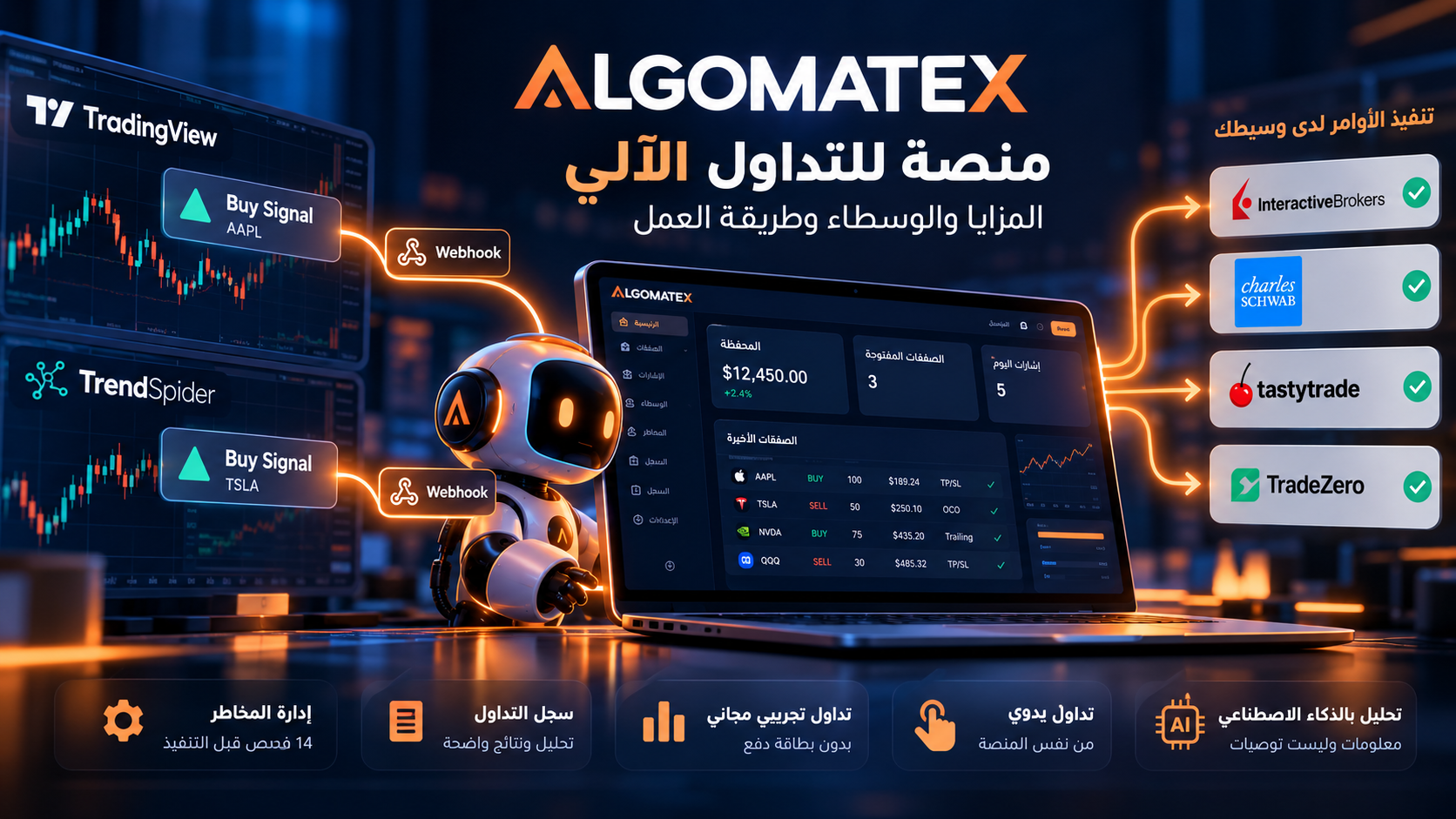
ALGOMATEX Automated Trading Platform: How It Works, Key Features, and Supported Brokers
ALGOMATEX is a technology platform that connects trading alerts to a user's brokerage account, allowing signals to become trade orders after applying configured risk controls. It also offers manual trading, paper trading, and trade analytics. ALGOMATEX is not a broker and does not hold client funds; funds remain with the connected broker. Learn more on the official ALGOMATEX features page.
What Is ALGOMATEX?
ALGOMATEX is designed for traders who already have a strategy or alert source and want to connect it to a brokerage account rather than entering every order manually. A charting and analysis platform such as TradingView generates an alert based on user-defined conditions; ALGOMATEX receives that alert, checks execution rules, and forwards instructions to the connected broker. This distinction matters: ALGOMATEX does not replace a brokerage account and does not include a TradingView or TrendSpider subscription.
The platform also provides a manual order ticket, simulated trading accounts, and a journal for measuring trade outcomes. Understanding each service separately helps traders assess whether it fits their workflow. Read the official how-it-works guide.
Explore ALGOMATEX FeaturesHow Does a Trading Signal Become a Broker Order?
According to ALGOMATEX, the workflow has three main stages: configuring the signal, receiving and validating the alert, and sending the order while recording its outcome. The website reports that order forwarding typically takes less than 400 milliseconds. This is the company's operational claim, not an independent measurement of broker execution quality or a guarantee of any particular fill price.
- Signal setup: The user specifies target accounts, asset, direction, position size, and exit settings in the Signal Builder.
- Alert reception: A Webhook message arrives from the alert source and is checked against risk controls and account settings.
- Execution and logging: If the signal passes the checks, it is sent to the broker with supported exit instructions, and the result appears in system and trading logs.
Available order types—including take-profit, stop-loss, and linked orders—depend on the broker, asset class, and trading session. Verify the relevant integration before relying on a specific exit method.
Key ALGOMATEX Services and Features
AutoTrade: Automating Trading Alerts
AutoTrade receives alerts from TradingView, TrendSpider, and other Webhook sources. Users configure position sizing and entry/exit instructions in advance. This does not mean the platform creates a profitable strategy or guarantees that the alert is correct. Outcomes depend on the signal source, liquidity, slippage, and broker conditions.
Manual Trading
The manual trading interface offers an order ticket alongside charts and prices, with sizing by quantity, value, or percentage and protective levels where supported by the broker. It suits traders who prefer to decide when to execute while maintaining a unified trade record.
Connecting AI Applications
AI Connect allows MCP-compatible applications, including ChatGPT, Claude, and Gemini, to read account, performance, and trade data through read-only permissions. The connection does not authorize AI applications to place orders and can be revoked by the user. AI-generated analysis is informational, not investment advice.
Analytics and Trading Journal
The trading journal and analytics collect measures such as net profit and loss, win rate, profit factor, drawdown, and performance breakdowns by strategy, day, and hour. These metrics help explain historical activity but do not establish that past results will recur.
Logs and Alerts
The alerts and logs service documents signal reception, validation, and execution, with notification options through Telegram, mobile devices, and email. The page also describes a manual approval workflow for pending trades; test it before using real funds.
How to Get Started and Connect a Brokerage Account
The official help center describes starting with a free account for testing or choosing a paid plan to connect a live broker. The trading interface includes a section called “Brokers.” These are the documented general steps; the authorization screen may vary by broker.
- Visit the ALGOMATEX website and register or sign in.
- Start with a paper account if this is your first time testing the setup.
- Check the supported brokers list and your broker's page for supported assets and orders.
- For live trading, choose an appropriate paid subscription from the Pricing page.
- Open the “Brokers” section in ALGOMATEX and follow your broker's displayed authorization instructions.
- Once connected, review account status and permissions, then test a small alert in a paper environment before trading live.
This guide does not invent broker-specific authorization buttons or fields that have not been verified on the relevant integration page. Consult the help center if the connection process differs.
Check Broker CompatibilityHow to Use ALGOMATEX with TradingView
ALGOMATEX uses TradingView alerts as a signal source. A separate TradingView subscription with Webhook capability is required. According to the ALGOMATEX help center, Webhooks begin with the paid Essential plan and require two-factor authentication; watchlist alerts require Premium or higher. Review TradingView's current pricing and limits before subscribing.
- In ALGOMATEX, open “Signal Builder” and select “Target Accounts,” “Asset Type,” “Direction,” “Signal,” and “Asset Symbol.”
- Set trade size, take-profit, and stop-loss options to match your plan, then copy the JSON template provided by ALGOMATEX.
- Copy your account-specific Webhook URL from the “Webhook” page in ALGOMATEX. Do not use an example URL from an article.
- In TradingView, create the desired alert and paste the link into “Webhook URL” and the template into “Message.”
- Save the alert, test delivery to a paper account, and review the system log to confirm the result.
The message may contain TradingView placeholders such as {{ticker}} and {{close}}, which TradingView replaces when sending an alert. The message format must match the ALGOMATEX-generated template. Review the Signal Builder and workflow guide before activation.
ALGOMATEX also mentions TrendSpider alert integration, but TrendSpider subscriptions and alert capabilities are separate from ALGOMATEX.
Supported Brokers and Integrations: What Should You Verify?
At the time of the original review, the official integrations page listed 31 providers and described asset classes and connection capabilities for each. A broker's presence in the directory does not mean every order type or trading session is supported for every account. Capabilities vary by broker and product. The following are examples from the official list:
| Provider | Listed Integration | Status | ALGOMATEX Reference | Official Website |
|---|---|---|---|---|
| Interactive Brokers (IBKR) | Stocks and options | Listed as supported; verify account permissions | Integrations directory | Interactive Brokers |
| Charles Schwab | Stocks and options; the directory mentions reconnecting every 7 days | Listed as supported | Integrations directory | Charles Schwab |
| TradeZero | Stocks and options | Listed as supported | Integrations directory | TradeZero |
| tastytrade | Stocks, options, and crypto as listed | Listed as supported | Integrations directory | tastytrade |
| TradeStation | Stocks and options | Listed as supported | Integrations directory | TradeStation |
| Tradier | Stocks and options | Listed as supported | Integrations directory | Tradier |
The broker websites above are informational references, not evidence of formal commercial partnerships. To check short selling, bracket orders, extended hours, or automatic closing, open the broker's detailed integration page from ALGOMATEX before connecting a live account.
Paper Trading vs. Live Trading
ALGOMATEX Paper Trading provides free simulated accounts without a payment card or brokerage account and, according to the website, applies the same risk-check gates. Users can set an initial balance, review trade records and analytics, and reset the account.
In simulation, trades are recorded at the alert price, an important difference from live execution, which may be affected by liquidity, spreads, latency, and partial fills. Paper results therefore cannot guarantee the same results at a real broker. Live trading requires a paid plan and a compatible brokerage connection.
Start Free Paper TradingHow Does ALGOMATEX Manage Execution Risk?
ALGOMATEX states that every entry signal passes 14 pre-trade risk gates. Published examples include trade-count limits, daily profit and loss limits, trading windows, news blackout periods, duplicate signals, and opposing positions. The platform also provides a user-controlled kill switch.
Exit tools include take-profit, stop-loss, and trailing stops, depending on broker support. None guarantees an exit at the requested price: connections can fail, orders may be rejected or partially filled, and prices may gap past stop levels during volatile markets.
The official risk disclosure explains that trading may result in capital loss and that leverage, certain short positions, and derivatives can produce losses greater than the initial investment. Traders should monitor their broker account and retain the ability to manage positions directly when needed.
ALGOMATEX Plans and Subscriptions
The official pricing page describes a free plan for paper trading and paid plans for connecting live brokers. It lists monthly, three-month, six-month, and annual subscription options, with advertised discounts for longer terms. However, detailed numerical prices and plan limits were not visible in the readable version reviewed when the original article was prepared. Consult the pricing page directly for current amounts.
According to the pricing FAQ, a paid plan expires when its term ends or its signal credits are exhausted, whichever happens first. Eligible BUY signals consume credits, while SELL signals to close positions continue even when credits are depleted. The site says signals rejected by risk controls do not consume credits. Review the conditions of each plan before paying.
Compare Subscription PlansWho Might Benefit from ALGOMATEX?
ALGOMATEX may suit traders using TradingView or another alert source who want to convert their conditions into orders at their broker, as well as traders seeking manual and automated execution with a unified performance journal. It may also help users test strategies in simulation before connecting a live account or analyze trading history using read-only AI tools.
Before subscribing, verify broker compatibility, supported assets and order types, the need for a separate alert-source subscription, position-sizing and exit rules, and any broker or market-data fees. Do not confuse ALGOMATEX's stated functions with guaranteed investment recommendations or custody of client funds.
Frequently Asked Questions About ALGOMATEX
What is ALGOMATEX?
A platform that executes trading signals through a user's broker, with manual trading, simulation, risk controls, and performance analytics.
Is ALGOMATEX a broker?
No. It connects to the user's brokerage account. Funds remain with the broker; ALGOMATEX neither holds nor withdraws them.
Can I try ALGOMATEX for free?
Yes. Free paper trading accounts are available without a card or live brokerage connection.
Do I need a TradingView subscription?
Yes, if you want to use TradingView alerts. It is a separate subscription and must support Webhooks with the required two-factor authentication.
How do TradingView signals reach my broker?
A TradingView alert sends a Webhook URL and JSON message to ALGOMATEX, which checks risk settings and forwards the order to the connected broker.
Does ALGOMATEX work with Interactive Brokers?
Interactive Brokers appears in the official integrations list for stocks and options. Verify your account's permissions and required order types before trading.
Does ALGOMATEX create my strategy?
It provides a Signal Builder for execution instructions. The user or their alert source remains responsible for the signal logic and trading conditions.
Can I place orders manually?
Yes. A manual order ticket offers sizing, order-type, and protective options subject to broker support.
Can ChatGPT place trades through AI Connect?
No. The advertised AI connection is read-only and cannot place orders.
What happens when signal credits run out?
The pricing page states that SELL signals to close positions continue, while entry signals are subject to the subscription's credit balance.
Does automated trading guarantee profits?
No. Risks include incorrect signals, slippage, delayed or rejected execution, and loss of capital.
Where can I find pricing and support?
Visit the pricing page or help center, or email [email protected].